

A caption is a short piece of text that explains or accompanies something else, usually an image, a video, or a document heading. On social media, it’s the words under your post. On video, it’s the on-screen text of what’s being said. In print, it’s the line under a photo. The word comes from the Latin capito, meaning “seizing” or “taking” originally referring to the part of a legal document that recorded where and how it was taken or executed.
Caption Meaning The Simple Definition
At its core, a caption is text that gives context to something visual. It answers the question a picture or video can’t answer on its own: what am I looking at, and why does it matter?
The word has an unexpectedly legal history. “Caption” probably comes from the phrase “certificate of caption” a legal term for taking or seizing something. Dictionaries still list this as the word’s oldest meaning: the part of a legal document that shows where, when, and by what authority it was taken, found, or executed.
From there, the meaning expanded. Today, dictionaries define captions more broadly as the heading of an article or document, or the explanatory comment accompanying a pictorial illustration and this is the sense that eventually gave us “photo caption,” “movie caption,” and “Instagram caption.”
Key Takeaway box:
Caption = short text that explains a visual or heads a document. Same word, three modern-day uses: social media, photos/print, and video. All three trace back to one legal-document sense from the 1600s.
The 3 Main Types of Captions
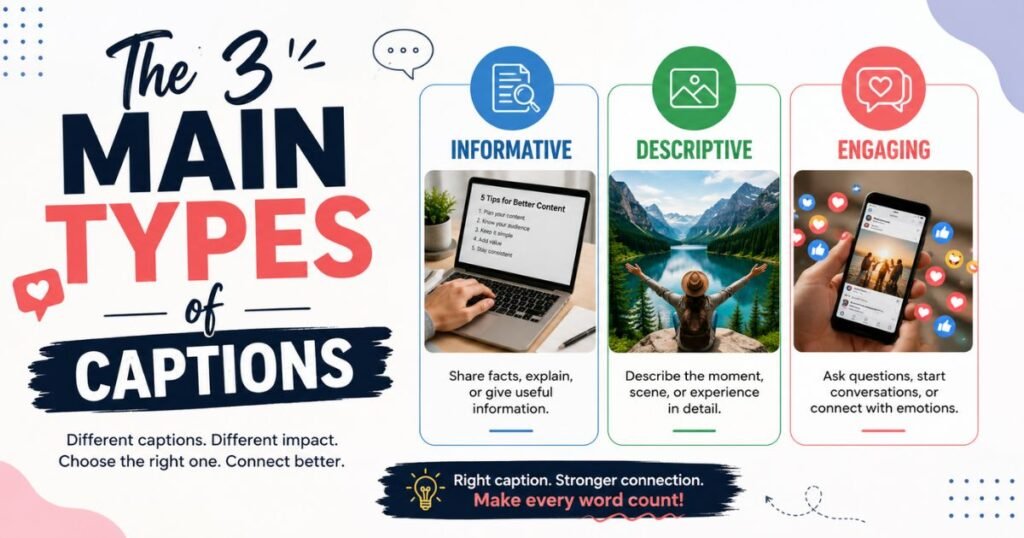
Once you know a caption is really an umbrella term, the confusion clears up fast. Here are the three types you’ll actually run into.
1. Photo & Journalism Captions
This is the original, oldest modern use. A photo caption is the line of text placed directly under (or beside) a picture, telling the reader what or who they’re looking at.
Example: A newspaper prints a photo of a flooded street with the caption: “Residents wade through floodwaters in Marikina City after heavy monsoon rain, July 2026.”
Newswriting guides teach a specific hierarchy for this: name who’s in the photo, what they’re doing, when, where, and for fuller captions why. Good photo captions add information the image alone can’t give you. They never just restate the obvious (“a man standing near water”).
2. Social Media Captions
This is the sense most people search for today and the one your everyday feed is built on.
A social media caption is the text you write underneath a post on Instagram, Facebook, or TikTok. Unlike a journalism caption, it’s not just descriptive it’s meant to add personality, spark engagement, and often includes hashtags or a call-to-action.
Example: A beach photo with the caption: “Wala nang mas masarap pa sa Sunday sa dagat #WeekendMode #PalawanTrip”
Captions here do three jobs at once:
- Add context tell people where, when, or why
- Drive engagement a question or CTA invites comments
- Improve discoverability hashtags and keywords help new people find the post
3. Video Captions (Closed vs. Open)
The third and most technical meaning is the on-screen text version of a video’s audio.
Closed captions (CC) can be turned on or off by the viewer. They’re a separate file layered on top of the video, and they typically include not just spoken dialogue but sound effects and speaker labels too.
Open captions are permanently burned into the video itself. Viewers can’t switch them off which is exactly why so many creators use them for Instagram Reels or TikTok clips meant to be watched on mute.
Self-contained answer: A closed caption is toggleable, synced on-screen text that includes dialogue, speaker names, and sound cues, so viewers can turn it on or off. An open caption is the same idea, but permanently embedded into the video it can’t be removed or hidden, and it works even on platforms without native caption support.
Caption vs. Subtitle vs. Title vs. Transcript
These four words get mixed up constantly. Here’s the difference, side by side:
| Term | What it does | Assumes the viewer can… |
| Caption | Text version of dialogue + sound effects, speaker IDs, music cues | Not hear the audio at all |
| Subtitle | Translated or same-language text of just the spoken dialogue | Hear the audio, but not understand the language |
| Title | A short heading or name for a document, article, or section | Nothing it’s a label, not a description |
| Transcript | A full written document of everything said, not timed to the video | Read it separately from watching |
The clearest distinction: captions assume you can’t hear, so they describe every sound. Subtitles assume you can hear, so they skip the sound effects and only translate the words. A transcript isn’t synced to the video at all it’s just the words, laid out as a standalone document, whereas a caption is broken into short, timed chunks that appear exactly when each line is spoken.
What Makes a Good Caption? (Quick Tips)
Whether it’s for a photo, a video, or Instagram, a few rules hold across every type:
- Add something the visual can’t say on its own don’t just describe what’s obviously visible
- Keep it short for video captions, aim for segments that stay on screen roughly 1–6 seconds; for social captions, front-load the important part in the first line or two
- Match the tone of the platform a journalism caption is neutral and factual; an Instagram caption can be playful, personal, or funny
- Use hashtags and keywords deliberately on social captions they’re a real (if small) discoverability lever
- Proofread for names and spelling a misspelled name in a caption undercuts the whole post’s credibility
How Filipinos Use Captions Differently on Social Media
One thing worth noting for a Philippine audience specifically: captions here rarely stay in one language. It’s common to see a caption open in English, drop into Filipino or Taglish for the emotional or funny part, and close with an English hashtag, something you won’t see addressed in most English-language “what is a caption” guides, since they’re written for a purely monolingual audience.
(Note: this section works best with a real example or two supplied by the brand, a specific client caption, a screenshot, or first-hand social data to make the point concrete rather than generic.)
Why Captions Matter
Beyond clarity, captions carry real practical weight:
- Accessibility captions are the primary way deaf and hard-of-hearing viewers access video content
- Engagement many viewers watch video with the sound off, especially on mobile, so on-screen captions are often the only way the message gets through at all
- Discoverability caption and subtitle text is readable by search engines in a way raw video and audio aren’t, which is part of why captioned content tends to surface in more searches
Conclusion
A caption is any short text that explains a visual or document but which kind of caption you mean depends entirely on context. On social media, it’s your post’s voice. In print or photography, it’s factual context. In video, it’s either toggleable (closed) or permanent (open) on-screen text. Knowing the difference helps you use the right one and write it well.
FAQs
What is a caption in simple words?
A caption is a short piece of text that explains something, usually a photo, video, or document. It tells you what you’re looking at or gives extra context that the image or video alone doesn’t provide.
What is a caption example?
A photo of a sunset with the text “Sunset over Boracay, June 2026” underneath is a photo caption. An Instagram post with “Best day ever #Boracay” is a social media caption.
What is the difference between a caption and a subtitle?
A caption includes dialogue plus sound effects and speaker labels, and assumes the viewer can’t hear at all. A subtitle only translates spoken dialogue and assumes the viewer can hear but doesn’t understand the language.
What is the difference between a caption and a title?
A title is a short name or heading for something, a document, article, or chapter. A caption is descriptive text that explains a specific visual or accompanies a heading; a title labels, a caption explains.
What is a closed caption?
A closed caption is on-screen video text including dialogue, sound effects, and speaker names that viewers can turn on or off, unlike open captions, which are permanently part of the video.
